Start with the website and your eligibility
Use the regional registration page referenced in this guide and inspect its final address before entering details. Confirm that the country is Philippines and the account currency is Philippine peso (PHP). See the public form check ; these selectors do not establish Philippine eligibility or bonus terms. See the Country and PHP examples . Our PAGCOR record check covers the separate local authorization question.
This guide is for adults aged 21 and over. Use your real location and accurate information. If the operator does not accept your circumstances, do not choose a different country to bypass the restriction. This affiliate site does not collect registrations or identity documents.
What we could verify in the public form
The regional registration link redirected to 1xlite-0673.pro during the public-source inspection. Country and currency selectors were inspected without submitting registration. The observation does not establish ownership of the destination, local authorization or acceptance of a Philippine account.
- Country and currency are separate. Philippines and Philippine peso (PHP) were separately selectable in the public form. Check both fields; selecting a country alone does not confirm the currency of an accepted account.
- Country and currency do not confirm an offer. Check that any offer names Philippine peso (PHP) and includes terms applicable to an eligible Philippine account. Country and currency selections do not resolve the conflicting bonus information .
- The bonus choice can be changed in the form. Casino was initially selected. Choosing Reject bonuses selected that option and replaced the welcome-package banner. No account or bonus was created.
Still untested: account acceptance, confirmation-message delivery, the account currency after registration and any bonus actually assigned. No contact details, password or identity documents were entered. The Register button was not pressed.
Prepare your details without sharing them here
Prepare these privately before opening the form. This guide has no sign-up form and does not need your contact details or documents.
Before you start
- Contact access
- Use an email inbox, phone number or linked service that you control and expect to keep. Confirm that you can receive messages and recover access.
- Country and currency
- Use your actual country. Read the selected account currency before submission; a PHP promotion does not prove that PHP is selected or available. Ask support whether a currency can be changed later instead of assuming it can.
- Accurate identity
- Use your own accurate details wherever requested. Do not invent names or dates to get past a field. A later verification request may need to reconcile those details.
- Account security
- Prepare a unique password in a password manager and follow the form’s displayed requirements. Keep recovery codes private if the account later provides them.
- Bonus decision
- Know whether you want to review a casino offer or leave it unaccepted. Read the full conditions before choosing; do not rely on the headline.
If you may already have an account, start with account recovery . Do not register again to work around an inaccessible phone or forgotten password.
Check Philippines and PHP before registration
The illustrations below show the country and currency fields to check. They are editorial examples, not screenshots of an operator form or proof that registration is available.
-
Confirm your actual country
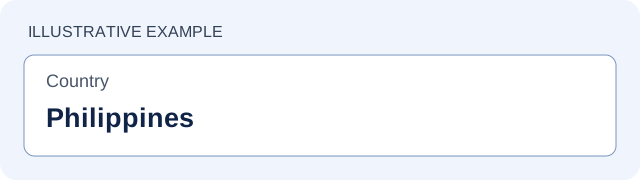
Illustration only. Use Philippines only if it matches your real location and the operator accepts your circumstances. Read the country field before entering personal details. If Philippines is unavailable or you cannot confirm eligibility, resolve the issue through verified operator support.
-
Check Philippine peso separately
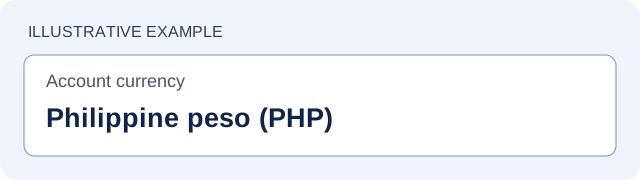
Illustration only. PHP identifies Philippine peso; this example is not an accepted account. Read the account currency field itself. Confirm PHP separately from the country and ensure the offer terms use the applicable currency. A promotion headline does not establish account currency.
-
Verify the address and terms
Inspect the final address after redirects, eligibility and full offer conditions before sharing details. Use the address and support checklist . This guide does not submit registrations or test post-registration screens.
Registration: the public form, step by step
The regional link opened a public registration form during the source inspection. Philippines and PHP could be selected separately; no registration was submitted. The Country and PHP examples show which fields to check; the new check records the later interaction. The steps below do not describe a completed account. Post-submission screens were not tested.
- Choose a recoverable method. The form offers email, phone and linked social or messenger sign-in. Use a contact or service you control.
- Review the bonus selection. Separate casino from sports. The form also provides a reject/defer choice; see the next section.
- Set your actual country and review currency. Philippines and Philippine peso (PHP) were selectable in our public-form check. Verify the currency field separately from the country field. Acceptance of an account in PHP was not tested. Do not assume a peso headline sets your account currency.
- Complete the fields for your chosen method. The email view shows email and password fields, plus an optional promo-code field. Check spelling, use a unique password and leave an unknown code out.
- Read the linked terms and privacy policy before submitting. The registration control states that submission accepts these terms and confirms legal age.
- Follow any confirmation requested on your own screen. Record your account identifier privately, preserve recovery access and review the account details. We did not test what happens after submission.
Choose a product or defer the bonus
The public form separates casino/1xGames and sports promotions. It also displays “Reject bonuses” with “Make your choice later”. in the source snapshot, selecting the reject option changed its radio control to selected and removed the welcome-package banner. This confirms the form selection only, not that an account was created without a bonus or that a later offer is guaranteed.
Before accepting, obtain the full bonus conditions . Check whether a choice is preselected, which product it applies to and whether opting out affects any later promotion. A referral link does not by itself guarantee a bonus.
Casino and sports requirements are separate. If the offer is unclear, use the bonus-terms questions before accepting. No promo code is required by this guide, and we have no verified code to supply.
After a registration confirmation
We did not submit the form or test these account screens. If you complete registration yourself, use the following checks where the operator provides them:
- Save the account identifier privately. Keep the confirmation and access to the contact or linked sign-in used.
- Review the account details. Check country, currency and contact information before funding; resolve mistakes through support.
- Check the bonus state. Distinguish an offer displayed on a page from a bonus you actually accepted or activated. Keep a copy of its terms.
- Review security settings. If additional authentication or recovery options are offered, set them up through the account and store recovery information securely.
- Check remaining requirements. Account creation does not confirm completed identity verification , payment availability or local authorization. Review the payment checks before any deposit.
If you already have an account
Use account recovery before opening a new account to fix a login problem. An inaccessible phone, missing verification message and forgotten password are different issues. Collect the exact error and tell support which recovery method you can still access.
Registration does not by itself confirm a payment method, an active bonus or permission to use the service locally. Check those questions before moving on to deposits .
Before sharing data or installing files
Check the final domain, verify support contacts and keep authentication codes private. Read the practical security checklist before following a new link, sending evidence or installing a file.
Register at 1xBet
Read the terms shown for your eligible account before registering or making a payment.
Register at 1xBet21+; eligibility and local authorization must be checked. About this guide .
Sources and further reading
- Regional registration link: country/currency controls checked; account not created
- Regional KYC policy: full requirements not readable in the source snapshot
- Regional contact page: recipient must be confirmed for your case
Source links are provided for checking current information. A global page does not confirm Philippine account conditions.
If registration gets stuck
These are general troubleshooting steps, not errors reproduced in a completed PH registration. Use the case that matches your screen.
If the operator requests a code, check the displayed destination first. For email, check spam and filters; for SMS, check reception and blocked senders. Follow the resend timer shown on the page instead of repeatedly requesting codes.
If delivery still fails, save the time, channel and redacted destination, then ask operator support what to do next. Do not share a code with a support agent or use a public SMS inbox.
Check whether you previously registered through that contact or a linked service. Use the recovery steps for the existing account. If you do not recognize the account, ask support to investigate ownership through its verified route. Do not try a new contact simply to bypass the message.
Confirm that you are viewing the intended regional page and inspect its final address. If your actual country or intended currency is unavailable, leave the form unsubmitted and ask about eligibility and supported currencies. Do not select a false country or assume that the currency can be corrected after funding.
Read the error next to each field and any terms or confirmation control. Check typing and unwanted spaces. Follow the phone format shown on the form; avoid entering a country prefix twice when there is a separate selector. For passwords, use the requirements on your screen.
If the form still fails, record the exact error, page address, time, browser and device. Redact passwords, codes and unrelated personal information from screenshots. If a request may already have been submitted, check for a confirmation or existing account before retrying.
Before submission, correct the selection and review the summary again. After an account or bonus has been created, ask support for the correction process before funding or opening another account. If a bonus is already active, read the cancellation and balance checks before removing it.
KYC: respond to the exact account request
PH requirements remain unverified — inspected in the source snapshot. The public KYC page was reachable, but its full policy was not readable. We cannot confirm a universal document list, file limit or processing time. The checklist below helps you clarify the request shown in your own account; it is not a claim that every item is required.
Check the requested files · Resolve a problem · Copy questions for support
Clarify the file requirements first
- Purpose and document
- Ask whether the check concerns identity, address or payment ownership, and which document types are accepted for that purpose. Do not substitute a document from someone else.
- Validity and dates
- Confirm whether the document must be unexpired and how recent any statement must be. This guide does not assume a standard three-month limit.
- Sides and extra evidence
- Confirm which pages or sides are required. A selfie, liveness check or payment statement should be provided only if specifically requested through a verified route.
- File requirements
- Confirm permitted formats, maximum file size and whether an original digital statement, scan or photograph is needed. A screenshot may not be an accepted substitute.
- Visibility and masking
- Ask what must remain visible and what may be masked. Never disclose passwords, OTPs, recovery codes, card PINs or CVV/CVC security codes.
Before sending a document
- Verify the request and destination. Open the operator site through the route you already trust and confirm the request in your account or through its established support contact. If email is requested, confirm the exact recipient for your case. The regional contact page was readable in the source snapshot; a listed mailbox alone does not confirm where your documents belong.
- Check the image against the instructions. Make text readable, avoid glare and blur, and include required edges, pages and sides. Do not alter names, dates or numbers. Follow the stated rules for cropping, masking or watermarks instead of guessing.
- Use the confirmed private channel. Do not post files in a public chat or send them to this affiliate guide. Avoid uploading identity documents to an unrelated online file converter merely to reduce their size. If the request is unclear or asks for authentication secrets, pause and verify it independently.
- Keep the receipt and follow-up date. Save the case number, submission time and confirmation privately. Ask when to follow up and how you will be notified. A successful upload is not the same as approval.
If verification is rejected or delayed
These are general responses to possible problems, not failures reproduced in a PH account.
Ask which page or area could not be read. Retake the requested image with clear text and no glare; include the required sides and edges. Do not change the document’s contents or repeatedly send the same rejected file.
Request the accepted alternatives and exact validity, format and size requirements. If your available document does not meet them, explain that and ask for the next permitted option. Do not invent dates or assume a different document will work.
Identify the precise mismatch and ask for the account-correction or evidence process. Explain a legitimate name or address change through the verified channel. Do not edit evidence to match incorrect account data or open a second account to bypass the check.
Check whether you received an upload confirmation or case reference. Ask whether the file was received, what is still outstanding and the next update window. If that window passes, follow up in the same case. No universal PH approval deadline is confirmed here.
For a failed upload, note the error and compare the file with the stated size and format limits. Check whether it was already received before retrying. For an unexpected email or chat request, confirm it through your established account/support route before opening links or sending evidence.
Copy a verification clarification request
After approval: confirm what was approved and whether another check remains. KYC approval alone does not establish that a withdrawal has been released; use the withdrawal status guide for that separate question.